
Time tracking that connects projects, billing and profitability
TimeMagick is time tracking software that connects tracked hours to projects, budgets, billing and profitability, for project-based service businesses, agencies, engineering and design teams, consultancies, software teams and freelancers.
1-month free trial on the Business plan · No credit card required · Windows, iOS, Android and web
What is TimeMagick?
TimeMagick is time tracking software that connects tracked hours to projects, budgets, billing and profitability. Every hour is tracked against a client, project and task, so the same data shows how the project is going, what can be billed and which clients are profitable.
- Step 1Track timeDesktop, mobile and manual time against a client, project and task.
- Step 2Plan the workProjects board, Gantt and resource planning.
- Step 3Watch the budgetBudget against spent time, with alerts and forecasting.
- Step 4Approve billable hoursSet how much of each tracked entry is billable.
- Step 5InvoiceProject Billing shows billable against billed hours; invoices and recurring invoices.
- Step 6See profitabilityProject and client margin, 14 KPIs and Client Health.
How TimeMagick differs from a standalone time tracker
A timer records hours. TimeMagick connects those hours to the work, the budget, the invoice and the margin.
Hours belong to projects
Time tracking starts when a person selects a project and task and presses Start, so every entry carries its client, project and task.
Budgets stay visible
Budget against spent time appears on project cards, the Gantt, time approval and the dashboard, with budget alerts and forecasting.
Approved hours become invoices
Approvers set how much of each entry is billable; Project Billing shows what is billable and what is already billed.
Profitability from the same data
Revenue, profit, client margin, effective rate and Client Health come from the hours, rates, invoices and expenses already in TimeMagick.
Activity without screenshots
During tracked time, TimeMagick records activity levels and app and website usage. It does not take screenshots.
Every plan includes every feature
See pricing
Who TimeMagick is for
TimeMagick is built for teams that sell project work to clients.
By industry
- Engineering & Design StudiosProject hours, budgets and billing for engineering, CAD and design studios.
- Software DevelopmentReleases, billable hours and project margin for software teams.
- Architecture FirmsDesign phases, fee budgets and client visibility for practices.
- Consulting FirmsConsultant hours, utilisation and client profitability.
- Marketing AgenciesCampaign budgets, billable work and client margin.
- Creative & Design StudiosRevision rounds, project budgets and creative billing.
- AgenciesClient projects, billable hours and profitability for agencies.
By team size
Comparing tools? See TimeMagick vs Clockify, TimeMagick vs Toggl, TimeMagick vs Harvest, TimeMagick vs Hubstaff, TimeMagick vs TimeCamp, TimeMagick vs DeskTime, and TimeMagick vs Time Doctor.
From tracked time to projects, billing and profitability
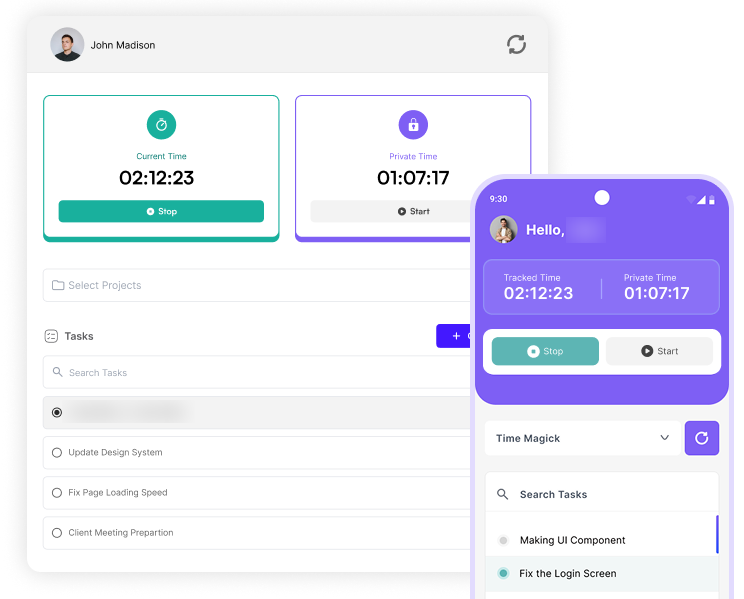
Time Tracking
Start a timer on a project and task in the Windows desktop app or on mobile, or add manual time with a reason for approval. Desktop and mobile time are reported separately.
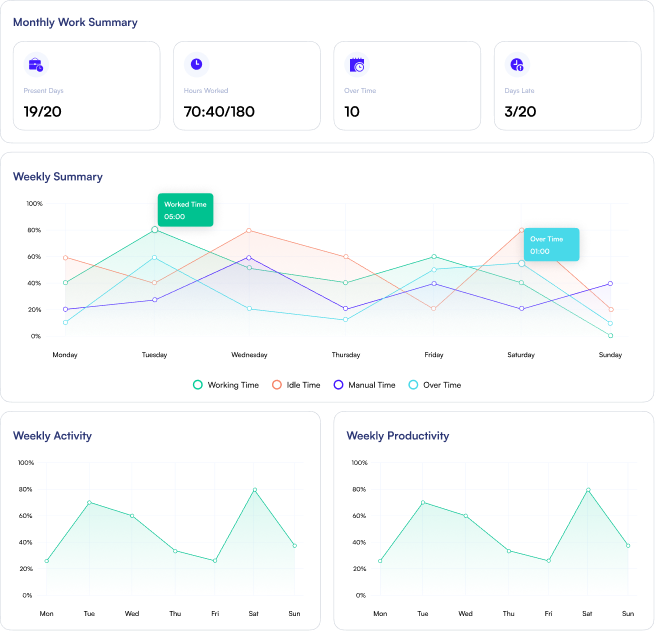
Member Dashboard
Members see their worked, idle and manual time, hours against contracted hours and their weekly trends.
Day by day report
Shows a day-by-day breakdown of tracked working or billable hours for each client.
Projects & Gantt
Projects
Create projects, set deadlines, assign team members and responsible owners. Monitor task progress, overall project completion, and total hours logged, all in one place.
Project Card Drag & Drop
Drag project cards between status columns to change their status. Cards show the due date, tasks, budget hours and chat and attachment indicators.
Gantt chart
Plan project timelines and task breakdowns, with budget and spent time beside every bar, per project and across the client portfolio.
Tasks
Create and assign tasks to team members. Manage task status, and track time spent on each task.
Project Overview
Get an overview of the number of hours spent, tasks completed, and who worked for how many hours.
Budgets & Billing
Project budgets
Budget against spent time for every project, with budget alerts and forecasting.
Project Billing
View total billable and billed hours across all your projects. Identify what's pending and what's already invoiced.
Invoices
Create invoices from billable hours or manual lines, schedule recurring invoices with approval, and download PDFs to share with clients.
Profitability & KPIs
KPIs & Trends
View key business results, client activity, and performance trends in one place.
Insights
Understand client activity, work hours, and profitability at a glance.
Revenue & Profitability
Tracks uninvoiced hours, project profit, client revenue, and client health.
Client Portal
Client Dashboard
Client Members get their own workspace with a Dashboard of their projects, tasks, weekly hours and due tasks.
Client Projects, Timesheets & Report
Clients follow their projects, timesheets and a detailed report, talk to your team in Message Channels and ask Sensai, without access to your internal billing or profitability.
Reports
Admin Dashboard
Get a complete overview of work, projects, and performance in one centralized admin dashboard.
Client Reports
View and export detailed reports for each client, including project progress, profitability, and salary expenses.
Project Reports
Dive deep into project-level insights. See who worked on which tasks and track total hours, all in one place.
Detailed Report
Budget hours, time spent, billable hours and billable amount for every client project, exportable to formatted Excel.
Company & Recurring Expenses Report
Audits direct corporate expenses and recurring project payments.
Expenses
Lunch Expense
Add and manage the approvals of lunch expenses. Made for both members and admins.
Company Expense
Add and manage the approvals of company expenses, and get the summary. Made for both members and admins.
Recurring Expenses
Add and manage the approvals of recurring expenses, and get the summary. Made for both members and admins.
Activity & Productivity
Activity Tracking
Activity levels from keyboard activity, mouse clicks and mouse movement during tracked time, with a calculation your company configures.
Apps & URLs Tracking
See which apps and websites are used during tracked time, classified productive, neutral or unproductive. No screenshots are taken.
Communication
Project channels
Every project automatically gets its own channel, available on the project page and in Message Channels.
Direct messages & groups
Message colleagues directly, or use group conversations alongside project channels.
Files, emoji & unread badges
Share file attachments and emoji. Unread badges and the Unread filter show what is new, and the channel list is searchable.
Sensai AI
Sensai AI assistant
Sensai is TimeMagick's built-in AI assistant. Ask questions in a chat, with your account's project, client and time data as context.
Conversation history
Search earlier Sensai conversations in the thread sidebar, start a new chat, or continue where you left off.
Roles & Permissions
Roles & Permissions
Custom roles across 40 permission modules, with View, Create, Update and Delete actions where each applies, from projects and reports to invoices and project channels.
See TimeMagick in Action
A 2-minute walkthrough of TimeMagick.
Explore TimeMagick Features
Learn how each feature works with step-by-step video demonstrations.
Manual Time Tracking
Log and approve manual time entries with clear workflow controls.
Flexible Plans. No Hidden Fees.
Every plan includes every TimeMagick feature. The Business plan starts with a 1-month free trial; the Freelancer plan starts directly.
Freelancer
Billed monthly
Cancel anytime. Direct access.
- Up to 2 users
- All features included
- Time tracking and projects
- Budgets, billing and invoicing
- Profitability reports
- Email support
Business
Billed monthly
No credit card required during trial.
- Unlimited users
- All features included
- 1-month free trial
- Projects, Gantt and resource planning
- Client portal, invoicing and expenses
- Priority support
Enterprise
Tailored to your needs
Branding & Custom Subdomain
- Custom pricing for 30+ users
- Branding customization
- Dedicated subdomain (e.g., company.timemagick.com)
- All Business plan features
- Dedicated account manager
- 24/7 Premium support
Download Our App
Track time on Windows, iPhone and Android, and manage projects, billing and reports in the web app.
Frequently Asked Questions
Everything you need to know about TimeMagick.
What is TimeMagick?
TimeMagick is time tracking software that connects tracked hours to projects, budgets, billing and profitability. It is built for project-based service businesses, agencies, engineering and design teams, consultancies, software teams and freelancers. It includes desktop, mobile and manual time tracking, projects and Gantt planning, budgets, a client portal, project communication, expenses, invoicing, reports, profitability KPIs and Sensai, an AI assistant that answers questions about your data, with apps for Windows, iOS, Android and the web.
Read the full product overviewHow is TimeMagick different from a time tracker?
Besides tracking time, TimeMagick runs the projects the time belongs to, keeps budgets visible during delivery, turns approved billable hours into invoices and reports project and client profitability from the same data.
How much does TimeMagick cost?
The Freelancer plan costs $4.50 per month for up to 2 users. The Business plan costs $9.50 per user per month with unlimited users and a 1-month free trial. Yearly billing saves 20% ($3.80 and $7.60). Enterprise plans for 30+ users have custom pricing with branding and a dedicated subdomain.
Does TimeMagick have a free trial?
Yes. The Business plan includes a 1-month free trial with full access to every feature. No credit card is required to start. The Freelancer plan has no free trial.
Which platforms does TimeMagick support?
TimeMagick runs in the browser and has a desktop app for Windows and mobile apps for iOS (App Store) and Android (Google Play).
Does TimeMagick include team chat?
Yes. Every TimeMagick project automatically has its own chat channel, next to its tasks, tracked time and budget. Team members can also use direct messages and group conversations, with file attachments and emoji.
How project communication worksCan I give clients access to TimeMagick?
Yes. You can create Client Members: external accounts linked to one or more of your clients. They hold the CLIENT role and get a client-facing workspace with a Client Dashboard, Projects, Timesheets, Report, Message Channels and Sensai, separate from your team's internal workspace.
How the client portal worksDoes TimeMagick show project profitability?
Yes. TimeMagick's KPI module shows revenue, profit and margin by client, low-profit projects, projects over budget, uninvoiced hours and a Client Health ledger, using the tracked time, project budgets, client rates, expenses and billing data already in the product.
How profitability tracking worksIs TimeMagick suitable for engineering and design studios?
Yes, for project-based work. TimeMagick is not built only for engineers, but engineering, CAD and design studios can track time against each project and task, compare hours spent with project budgets, plan on a board and a Gantt, give clients a portal, invoice approved hours and see project profitability in the same system.
TimeMagick for engineering studiosIs TimeMagick suitable for agencies?
Yes, for project-based agencies and professional-service teams. Agencies can track hours against each client project and task, decide what is billable, compare billable with billed hours, invoice clients, give them their own workspace, and see which projects and clients are profitable, all from the same project data.
TimeMagick for agenciesWhat activity data does TimeMagick record?
During tracked time, TimeMagick records work time, idle time, activity levels and the apps and websites used, classified as productive, neutral or unproductive. TimeMagick does not take screenshots of employees' screens. Private Time withholds app and URL detail; it is recorded separately and not counted as worked time. Each member has their own dashboard, and roles and permissions control who can view which reports.
How roles and permissions workCan I invoice clients with TimeMagick?
Yes. Tracked billable hours flow into project billing, where billable hours are compared with billed hours. Invoices can be created and downloaded as PDF, and reports can be exported as formatted Excel files.
How billing and invoicing workRun your next project from tracked hour to client margin
Start a 1-month free trial of the Business plan with every feature included. No credit card required.