
Keep every project conversation with the project
TimeMagick is project communication software built into your project management and time tracking. Every project automatically has its own channel, so the conversation sits beside the project's tasks, tracked time, due date and budget. For everything that isn't about a single project, your team has direct messages and group conversations.
1-month free trial
The conversation belongs to the same project as the work
A project channel in TimeMagick isn't a chat room named after a project. It is part of the project record itself: the same record your team plans in, tracks time against and measures.
Because it is all one project, planning and communication refer to the same thing. When a question comes up in the channel (whether a task is finished, how much of the budget is used, when the work is due), the answer comes from the project the conversation is attached to, not from a separate tool that has to be kept in sync.
One project record
Everything below belongs to the same project
Channel
Created automatically with the project.
Tasks
Each with a due date, assigned members, a budget and a status.
Tracked time
Recorded by the desktop and mobile apps against the project and a specific task.
Due date
Set on the project and shown on its board card.
Budget and spent
Budget compared with time spent, on the project and on its card.
Members
The people assigned to the project.
Notes
A Project Notes panel that saves automatically.
What the project page shows
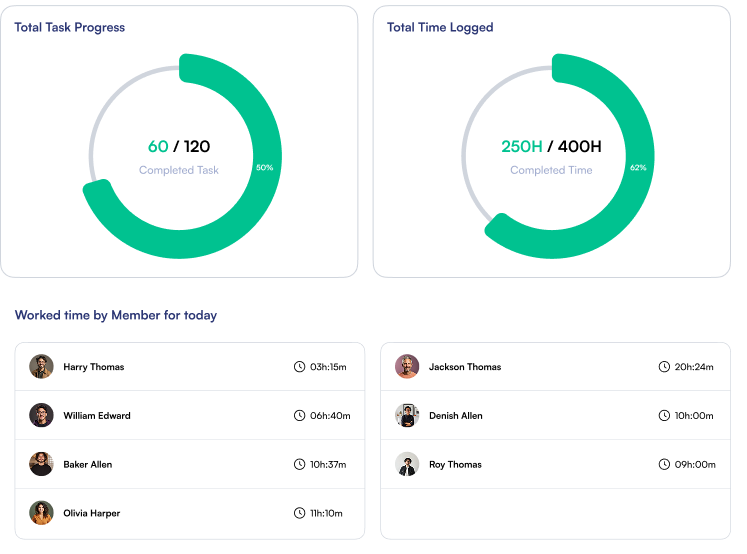
The project page includes worked time by member, a completed-task ring, and a completed-time ring that compares time spent with the budget and turns red when a project goes over. The project's chat channel is part of the same project page.
Every project gets its own channel, automatically
Created with the project
There's no channel to set up, name or keep in step with your project list. Each project has its own channel, tied to that project.
On the project page and in Message Channels
The project's chat is available from the project page, with member avatars, date separators, an emoji picker and file attachments. The same project channel also appears in Message Channels, so anyone following several projects can work through them from one list.
Visible from the projects board
Cards on the drag-and-drop projects board show chat and attachment indicators, next to each project's due date, task count and budget-hours bar.
Direct messages and group conversations
Not every conversation belongs to one project. Alongside project channels, TimeMagick supports direct messages between users and group conversations.
One Message Channels screen
Message Channels brings project channels, direct messages and group conversations into one screen. A filter rail narrows the list to Unread, Projects, Users or Groups, and the channel list is searchable.
Files, emoji and unread badges
File attachments
Share a file in the channel of the project it belongs to.
Emoji
An emoji picker for quick acknowledgements.
Unread badges
Channels with unread messages are marked, and the Unread filter collects them in one list.
Discussion in the channel, decisions in Project Notes
Project discussions and shared files remain attached to the project rather than being scattered across unrelated private conversations. For information that shouldn't scroll away, such as a decision, a client preference or a specification, each project also has Project Notes: a free-text panel that saves automatically.
For hand-offs to a colleague, TimeMagick's personal task list has For Me and For Other tabs, so a follow-up can be assigned as a task with a priority rather than sent as a message.
Access to project channels is set by role
Project communication is part of TimeMagick's role-based permission system. Project Channel and All Project Channels are two separate permission modules in the role permission matrix, which is organised into View, Create, Update and Delete columns.
They sit inside a permission model of 40 modules, set per role. Owner and CLIENT are locked system roles; custom roles such as Project Manager, Engineer or Contractor can be edited or deactivated. How roles and permissions work
A standalone chat tool, or chat inside the project
Standalone team messaging platforms such as Slack keep conversations in a communication workspace of their own. TimeMagick keeps each project conversation beside the project it is about.
| Aspect | Standalone team chat | TimeMagick |
|---|---|---|
| Primary context | Typically conversations and channels | The project |
| Project tasks | Often managed in a separate tool | On the same project, in the same workspace |
| Project time | Often tracked in a separate tool | Recorded against the same project and task |
| Project budget | Often managed elsewhere | Part of the project: budget compared with time spent |
| Project conversation | A channel is usually set up and organised around the work | Every project automatically has its own channel |
Project communication with clients
Client Members can access Message Channels, so project conversations stay inside the same TimeMagick workspace clients use to follow their work.
- Client Members are external accounts linked to one or more of your clients, holding the locked CLIENT role.
- In their Message Channels view, they have project channels and groups, with search and Unread, Projects and Groups filters.
- Messages support file attachments and emoji, the same as for your team.
- Their client portal also includes a Client Dashboard, Projects, Timesheets, Report and Sensai.
Part of the same system as your time tracking and projects
Project communication is one part of TimeMagick. The same projects also drive time tracking, planning, budgets and reporting.
Time tracking
Desktop and mobile apps record time against a specific project and task.
Project management
A drag-and-drop projects board, tasks, budgets and an interactive Gantt.
Reports & analytics
Client, project, member and expense reports, with formatted Excel export.
Pricing
Freelancer, Business and Enterprise plans, with a 1-month free trial.
Project communication in TimeMagick: key facts
- Every TimeMagick project automatically has its own project channel.
- TimeMagick supports project channels, direct messages between users and group conversations.
- Project chat can be accessed from the project's page and from the Message Channels screen.
- Message Channels can be filtered by Unread, Projects, Users and Groups.
- The Message Channels channel list is searchable.
- Messages support file attachments and emoji.
- Channels show unread badges.
- Project cards on the projects board can show chat and attachment indicators.
- Access to project communication is permission-controlled by role.
- Project Channel and All Project Channels are separate permission modules.
- TimeMagick's role permission matrix has 40 modules with View, Create, Update and Delete columns.
- TimeMagick records tracked time against specific projects and tasks.
- Project channels belong to the same project records used for tasks, tracked time, due dates and budgets.
- Client Members, TimeMagick's external client accounts, can access Message Channels, including project channels and groups.
Frequently Asked Questions
Project channels, direct messages, group conversations and access control in TimeMagick.
Does TimeMagick include built-in project chat?
Yes. Every project in TimeMagick automatically has its own chat channel. It is available on the project's page and in the Message Channels screen, alongside direct messages and group conversations.
Does every project automatically get its own channel?
Yes. Project channels don't need to be created or named separately. Each project has its own channel, tied to that project.
Does TimeMagick support direct messages?
Yes. Besides project channels, TimeMagick supports direct messages between users. Message Channels can be filtered by Unread, Projects, Users and Groups, and the channel list is searchable.
Does TimeMagick support group conversations?
Yes. Group conversations sit alongside project channels and direct messages in the Message Channels screen, which has a Groups filter.
Can files be shared in project messages?
Yes. Messages support file attachments and emoji. Project cards on the projects board also show chat and attachment indicators.
How is access to project channels controlled?
Through role permissions. Project Channel and All Project Channels are two separate permission modules in TimeMagick's role permission matrix, which covers 40 modules with View, Create, Update and Delete columns.
Is project communication connected to TimeMagick time tracking?
Yes, through the project. The TimeMagick desktop and mobile apps record time against a specific project and task, and each project has its own channel. The conversation, the tasks and the tracked time belong to the same project record.
Can clients take part in project conversations?
Yes. Client Members, which are external accounts linked to one or more of your clients, can access Message Channels, including project channels and groups, with search, unread filtering, file attachments and emoji.
Put the conversation next to the work
Start a 1-month free trial. Create a project and its channel is already there.